
Hotmail has many useful features. Hotmail now allow users to recover deleted mails, even if you have deleted from Trash/Deleted folder.

When we delete any email from inbox, it goes to Trash / Deleted folder. But what if you have deleted emails from Trash / Deleted folder also.
Hotmail now give you option to recover the deleted mails from Trash / Deleted folder also.
Here is how you can cover deleted emails in Hotmail:
- Login in your Hotmail account
- Go to Deleted folder.
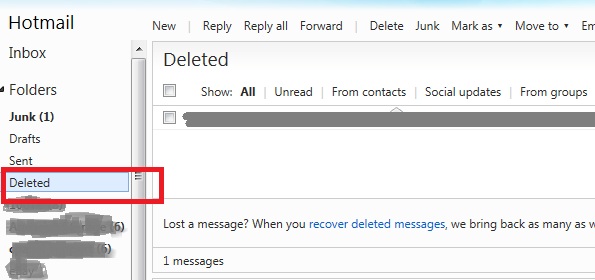
- At bottom of emails list, there is a link, recover deleted messages. You just need to click this link to recover all recent deleted emails from Trash / Deleted folder.
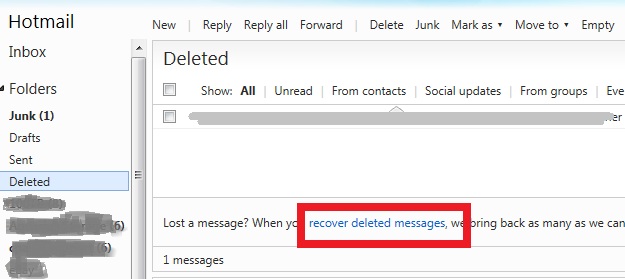
- If any message is not recovered. This means, its deleted permanently.
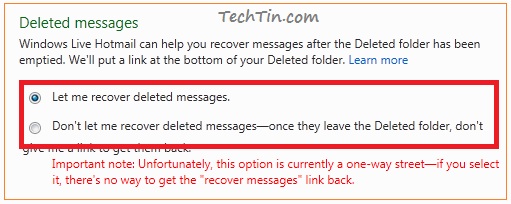
This feature is enabled by default in all Hotmail accounts. You can however, enable / disable this feature from Hotmail settings.
How to enable / disable Recover deleted mails in Hotmail
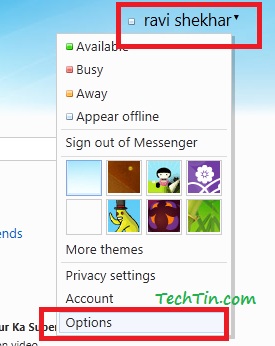
- Login in your Hotmail account and go to Option page.
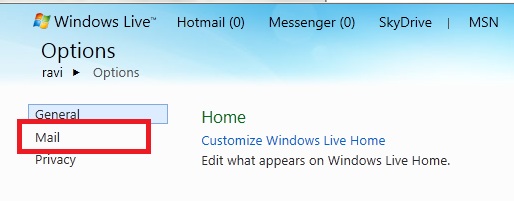
- Go to mail settings page.
- Click Advanced privacy settings.
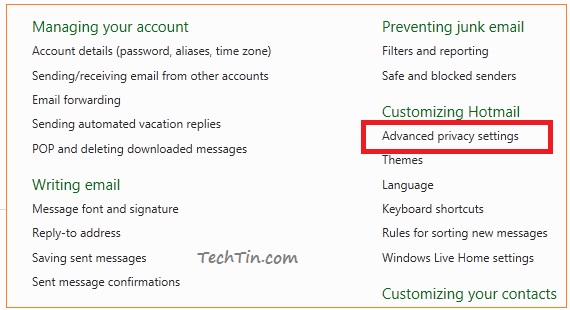
- On this page you can enable / disable recover deleted mails in Hotmail.
thank you so much, you just saved me a big big hassle replacing some attachments to messages I accideentially deleted!!!!!!
Thanks! it worked for me!!!!