Your privacy on internet / web is very important for you. Most internet users want their information deleted from internet or stored very privately.

If you are a Google Chrome browser users, you can improve your web privacy using Chrome Incognito.
What is Google Chrome Incognito
How to start Chrome Incognito
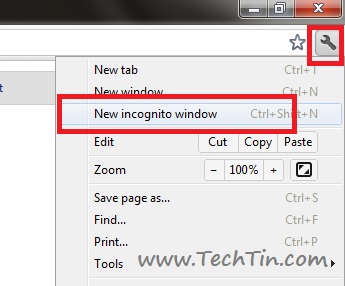
You can use keyboard shortcut Ctrl + Shift + N to open a Chrome Incognito windows.
Alternatively you can start from:
- Click the wrench icon on the toolbar.
- Select New incognito window.