
Google Chrome browser give you option to PIN a tab. This PIN is different from windows 7 taskbar PIN.
What is Google Chrome PIN Tab feature
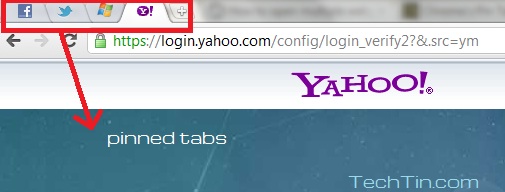
Below screenshot will help you understand better
Tabs before pinning (click on image to enlarge)

Tabs after pinning (click on image to enlarge)
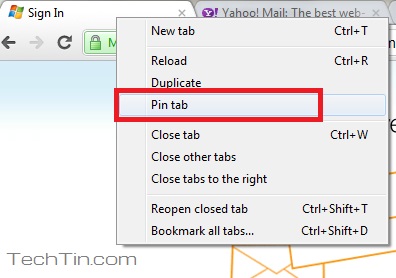
How to PIN a tab in Chrome browser
This is very easy. Simply right click on tab and select Pin tab
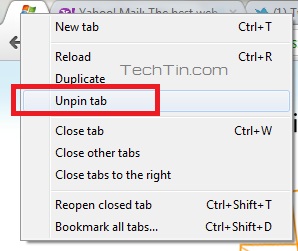
How to UNPIN a tab in Chrome browser
Right click the pinned tab and select Unpin tab
Pinning on the left seems odd, or at least redundant. If you put the tab on the far left, it will always be there. For me, it seems like pinning a tab to the right side of the browser would be vastly more useful. I often open links in new tabs that I do not have time to look at right then, and want to save for later. This can fill up quickly, and by virtue of being at the newest tab, you’re all the way on the right and have to move all the way back over to the left. If you had a “pin on right” option, you wouldn’t have to do anything; you’d be right there!
Maybe my explanation doesn’t resonate with you, but at the very least, I wish there was an option to pin on the right.
Thank you! These were perfect instructions.