
Startup programs itself runs at system startup. When we install any program with default installation procedure, in most cases it will activate itself as startup program. Lots of startup programs will actually increase system startup time and will decrease system performance.
We don’t need many programs at startup like Adobe reader, Adobe update, winzip, Google update etc. These programs should be removed from windows startup to improve windows 7 performance.
Personally I would enable only Antivirus, Firewall, Sound and graphics at startup.
In this post, I will show you how to add, remove, enable, disable a startup program in Windows 7.
First Method
Enable, Disable Startup Programs for current single user only
Start >> All Programs >> Right click Startup folder >> Open
Enable, Disable Startup Programs for all user
Start >> All Programs >> Right click Startup folder >> Open all users
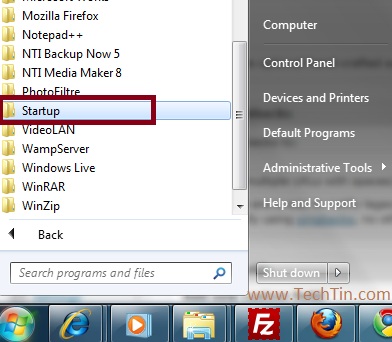
To remove any program from start up, just delete that program shortcut from the folder. To add a program in startup, create a shortcut of that program in that folder.
Second Method
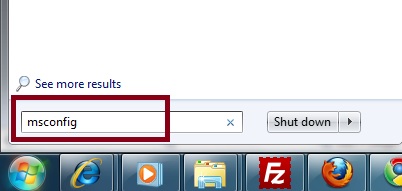
Start >> type msconfig in search box >> Press enter
Click “Startup” tab. Uncheck the program you want to disable from startup. Check the program that you want to enable at startup.
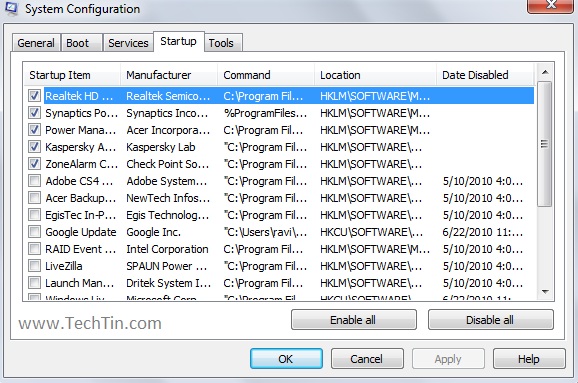
Click “Apply” button. Now Click Boot tab and check “Make all boot settings permanent” box.
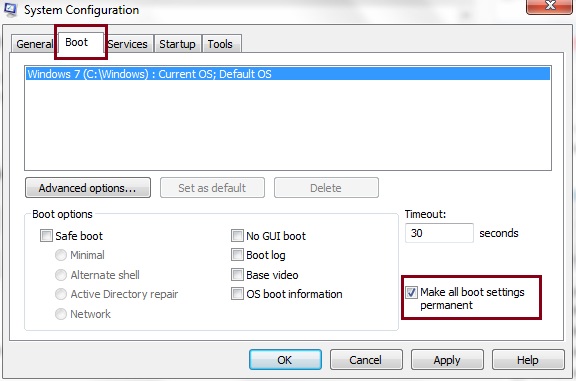
Now again click “Apply” button, Windows will show a warning message.
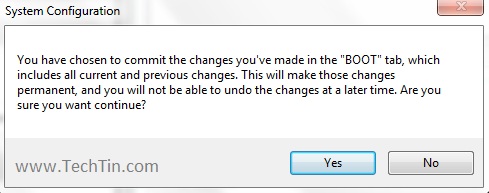
Click “Yes”. Now Windows will ask you to restart system. Click “Restart” button. Now your windows will restart.
Done!!
Third method
You can also enable disable, add or remove startup programs using some third party free software.
1. Autoruns for Windows
2. cCleaner