
• About Us
  • Contact
  • Sitemap
TechTin.com
  • Windows
    Windows XP / 7 / 8 / 10
    • Windows 7
    • Windows 8
    • Windows 10
  • Mobile
    Android, iPhone, Windows
    • Android
    • Apple
    • Gadgets
  • Web
    Google, Social, Hosting
    • Google
    • Windows Live
  • Software
    Reviews, Freebies, How to
    • Software
    • Browser
    • Microsoft Office
    • Freebie
  • Hardware
    computer hardwares
Home Google How to post Bold, Italic, Strike Through on Google Plus

How to post Bold, Italic, Strike Through on Google Plus

July 10, 2011
  • Google
  • Web
Google Plus
96658 Views
1 Comment

Google Plus let you post status, comment, message text as bold, Italic and Strike Through. But its little tricky but easy. I will show you how to post text as bold, italic and strike through on Google plus.

How to post bold text on Google plus
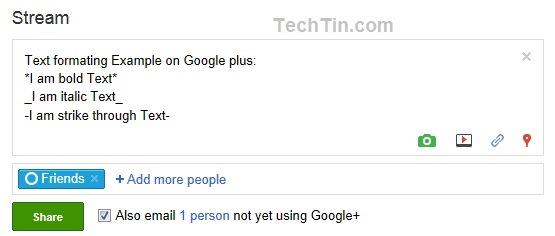
You have to use * symbol before and after the bold text.
Example: *I am bold Text*

How to post italic text on Google plus
You have to use _ symbol before and after the italic text.
Example: _I am italic Text_

How to post Strike Through text on Google plus
You have to use – symbol before and after the strike through text.
Example: -I am strike through Text-

Look below image, how I have posted on my Google plus account:
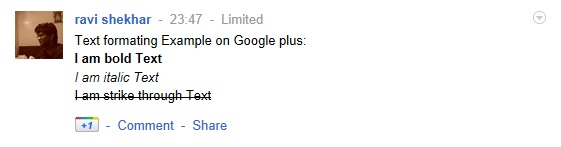
And here is outcome on Google Plus:
Previous Post
What is Google Plus Sparks
Next Post
How to Edit / Delete a post on Google Plus

Related Posts

  • Google launches Google Docs App for Android
  • Google Plus is now Open for all
  • Undo sent mail in Gamil
  • Punjab National Bank unable to clear Google Adsene Check
  • How to add more than one photo as profile photo in Google Plus

One Response to How to post Bold, Italic, Strike Through on Google Plus


Join the Conversation

  1. Joey says:
    July 20, 2011 at 2:50 am

    Is there any way to escape this formating if you just want to use those characters for something..?

    Reply

Leave a Reply Cancel reply

Your email address will not be published. Required fields are marked *

  • POPULAR
  • RECENT
  • Google Plus will be open for everyone on July 31st 2011
  • Google Plus is now Open for all
  • How to send Google Plus Invitation
  • Google Plus will reduce age restriction to 13 after 31st July 2011
  • How to turn on and turn off 3G on Samsung Galaxy Tab
  • How to set Google as default search engine in Edge Browser
  • How To Update Edge Browser
  • How To Turn Off App Automatic Updates in Windows 10
  • How to Change Date and Time in Windows 10
  • How to Shutdown and Restart Windows 10

Categories

  • Android
  • Apple
  • Browser
  • Featured
  • Freebie
  • Gadgets
  • general
  • Google
  • Hardware
  • India Broadband
  • Linux
  • Microsoft Office
  • Mobile
  • security
  • Software
  • Tech News
  • TechTin
  • Web
  • Windows 10
  • Windows 7
  • Windows 8
  • Windows Live
© Copyright 2026 TechTin.com – All Rights Reserved.